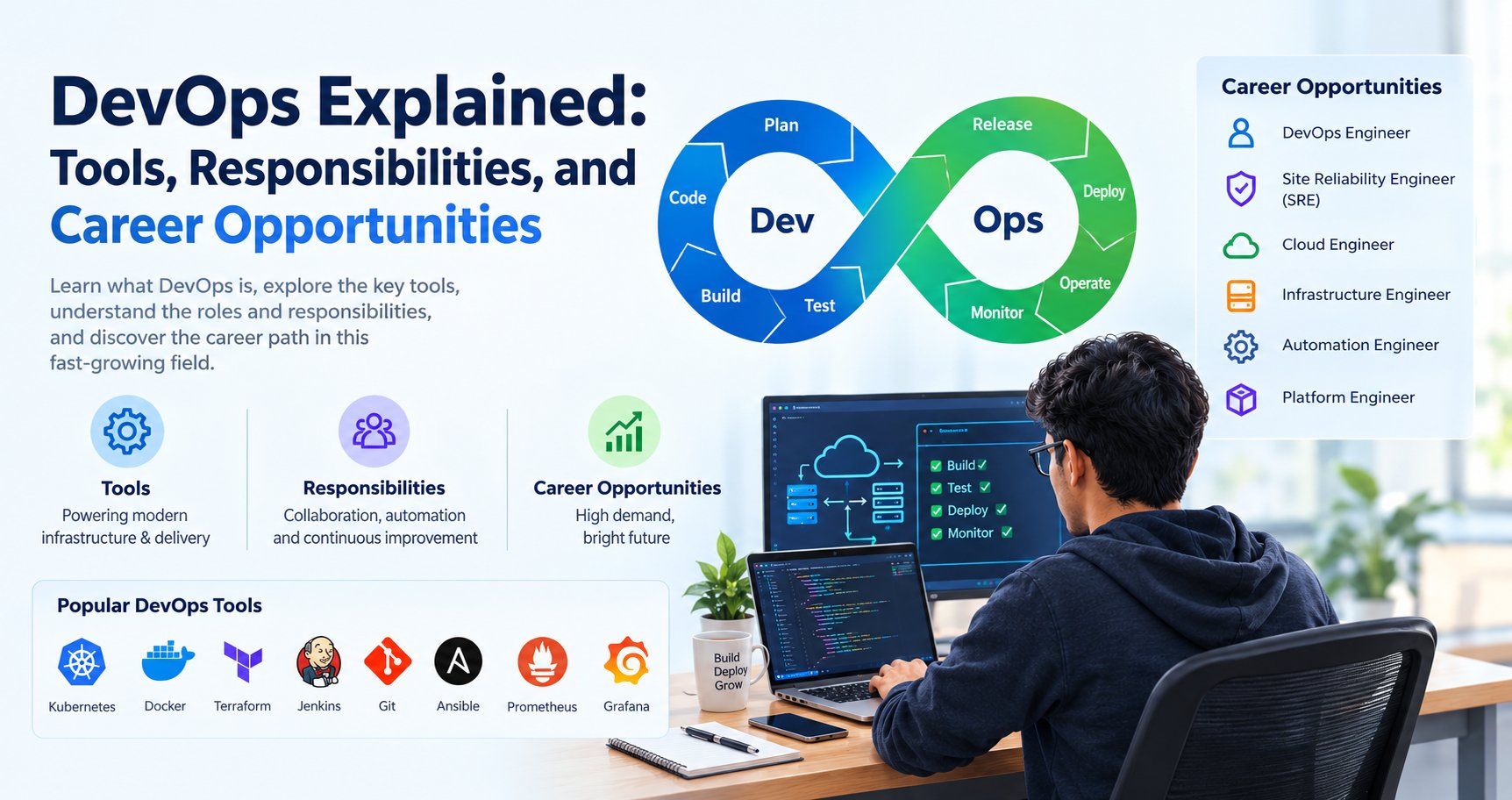
Software companies need to release updates quickly without compromising application stability, security, or performance. To achieve this, development and IT operations teams work together using automation, cloud infrastructure, monitoring, and continuous delivery practices. This approach is known as DevOps.
For IT students, freshers, and working professionals in India, learning DevOps can open a path towards roles involving software deployment, cloud infrastructure, automation, and application reliability. However, DevOps is not simply about learning tools such as Docker, Jenkins, or Kubernetes. It also requires problem-solving, scripting, system administration, collaboration, and an understanding of how software moves from development to production.
In this guide, you will learn what DevOps is, which DevOps tools are commonly used, what a DevOps engineer does, which skills beginners should develop, and how to prepare for DevOps career opportunities.
1. Why Is DevOps Important Today?
Earlier, development and operations teams often worked separately. Developers wrote application code, while operations teams handled servers, environments, deployments, and production issues. This separation could lead to communication gaps, inconsistent environments, and delays when releasing software.
DevOps encourages both groups to collaborate throughout the software lifecycle. Instead of treating deployment as a final task, teams automate and improve the process from code development to production monitoring.
Key benefits of DevOps
- Faster software delivery: Automated workflows reduce repetitive manual work.
- Improved reliability: Automated tests help detect defects before release.
- Consistent environments: Containers and infrastructure automation help reduce configuration differences.
- Better collaboration: Development, testing, operations, and security teams can share responsibility.
- Faster issue resolution: Logs, monitoring, and alerts help teams investigate problems.
- Repeatable infrastructure: Infrastructure as code makes environments easier to reproduce and manage.
For example, imagine a company developing an online shopping website. Every time a developer changes the product search feature, the team needs to verify the code, run tests, build the application, and deploy the update.
A DevOps workflow can automate many of these steps, reducing manual effort and making releases more consistent.
2. How Does the DevOps Lifecycle Work?
DevOps is a continuous process rather than a single tool or a fixed sequence that every company must follow.
A typical workflow includes the following stages:
Plan
The team identifies requirements, creates tasks, prioritizes work, and plans the release.
Tools may include Jira, GitHub Issues, or other project-management systems.
Code
Developers write application code and track changes using version control.
Common tools include Git and GitHub.
Build
The application is compiled, packaged, or prepared for testing and deployment.
Tools depend on the programming language and application, such as Maven for many Java projects.
Test
Automated tests check whether the application behaves as expected.
Testing may include unit tests, integration tests, security checks, and end-to-end tests.
Release and deploy
The application is packaged and released to the intended environment. CI/CD pipelines automate parts of this process.
Tools include Jenkins, GitHub Actions, and GitLab CI/CD.
Operate and monitor
The team runs the application, monitors its performance, investigates incidents, and maintains the underlying infrastructure.
Tools may include Prometheus, Grafana, and cloud monitoring services.
These stages create a feedback loop: monitoring results and user feedback help the team decide what to improve next. <Cite refs={["turn897014search1","turn897014search4"]}/>
3. Important DevOps Tools and Their Uses
There is no need to learn every DevOps tool at the beginning. Start by understanding the purpose of each category, then practise a small set of tools together.
| Tool | Main purpose | Beginner use case |
|---|---|---|
| Git | Version control | Track source-code changes |
| GitHub | Code hosting and collaboration | Manage repositories and pull requests |
| Jenkins | Automation and CI/CD | Build and test an application automatically |
| GitHub Actions | Repository-based workflow automation | Run tests when code is pushed |
| Docker | Containerization | Package an application with its dependencies |
| Kubernetes | Container orchestration | Manage containerized applications at scale |
| Terraform | Infrastructure as code | Define cloud infrastructure using configuration |
| Ansible | Configuration management and automation | Automate server setup |
| AWS, Azure, Google Cloud | Cloud infrastructure and services | Host applications and managed resources |
| Prometheus | Metrics collection and monitoring | Track service and infrastructure metrics |
| Grafana | Monitoring and visualization | Create dashboards and alerts |
The right combination depends on the application's architecture, the cloud provider, and the team's existing workflow. For example, Terraform helps provision infrastructure through code, while Docker packages an application into a container. These tools solve different problems. <Cite refs={["turn897014search3","turn897014search7","turn897014search9"]}/>
Git and GitHub
Git tracks changes to source code. GitHub provides a platform for hosting repositories and collaborating with other developers.
Learn how to:
- Create and clone repositories.
- Stage and commit changes.
- Create and merge branches.
- Resolve simple merge conflicts.
- Use pull requests.
- Write clear commit messages.
Practice project: Create a GitHub repository for a small Python application and maintain a meaningful commit history.
Jenkins and GitHub Actions
Continuous integration and continuous delivery, commonly called CI/CD, help automate the process of validating and releasing software.
Jenkins is an automation server that supports customizable pipelines. GitHub Actions allows teams to define workflows that run in response to repository events or other triggers.
Practice project: Configure a workflow that runs Python tests whenever code is pushed to a GitHub repository.
Docker
Docker helps package an application and its dependencies into a container. This can make it easier to run the same application across development, testing, and production environments.
Learn images, containers, Dockerfiles, ports, volumes, and basic networking.
Practice project: Containerize a simple Django or Flask application.
Kubernetes
Kubernetes manages containerized applications across a cluster. It provides capabilities such as scheduling, service discovery, scaling, and recovery from certain failures.
Beginners should learn Kubernetes after understanding Linux, Docker, networking, and basic deployment concepts.
Practice project: Deploy a containerized sample application to a local Kubernetes environment.
Terraform and Ansible
Terraform is used to define and provision infrastructure as code. Ansible automates tasks such as server configuration and software installation.
For example, Terraform can define cloud resources, while Ansible can configure a server after it has been created. The exact workflow depends on the environment.
Practice project: Use Terraform to define a small test environment, then use Ansible to configure a Linux server.
Cloud platforms
AWS, Microsoft Azure, and Google Cloud provide infrastructure and managed services used to host applications.
Start with one platform. Learn virtual machines, networking, storage, identity and access management, monitoring, and basic cost management before exploring advanced services.
4. What Does a DevOps Engineer Do?
A DevOps engineer helps teams build, release, and operate software more reliably by improving automation, infrastructure, monitoring, and delivery workflows.
Daily responsibilities vary. Some roles focus on CI/CD pipelines, while others emphasize cloud infrastructure, platform engineering, reliability, or security.
Common responsibilities include:
Automating repetitive tasks
DevOps engineers create scripts and automated workflows for building applications, configuring environments, running tests, and deploying software.
Managing CI/CD pipelines
They maintain pipelines that validate changes and move application builds through development, testing, staging, and production environments.
Working with cloud infrastructure
They help provision and maintain compute resources, storage, networking, permissions, and other infrastructure components.
Managing containers
Depending on the role, they create container images, maintain deployment configurations, and support container orchestration platforms.
Monitoring application health
They configure metrics, logs, dashboards, and alerts to help teams identify errors, performance problems, and service disruptions.
Troubleshooting production issues
They investigate failed deployments, resource shortages, network issues, and configuration problems. They may coordinate with developers and other teams to restore service.
Supporting security and compliance
They help protect secrets, control access, patch systems, manage dependencies, and incorporate security checks into development workflows.
Documenting processes
They maintain deployment instructions, infrastructure documentation, incident reports, and operational runbooks.
A key part of the role is making systems repeatable and understandable, rather than depending on manual steps that only one team member knows.
5. Essential Skills for a DevOps Career
DevOps combines technical knowledge with communication and troubleshooting skills. You do not need to master everything on day one, but you should build a solid foundation.
Linux fundamentals
Linux is widely used for servers and cloud workloads. Learn:
- Files and directories
- Permissions and ownership
- Processes and services
- Package installation
- Logs and troubleshooting
- SSH and basic networking
Practise using a Linux virtual machine or a suitable local environment.
Scripting and programming
Bash is useful for automating command-line tasks. Python can help with automation, API interactions, data processing, and operational scripts.
Start by writing small scripts to rename files, check service status, parse log files, or automate routine tasks.
Networking basics
Understand IP addresses, DNS, ports, HTTP and HTTPS, firewalls, routing, and basic troubleshooting. These concepts are useful when an application cannot reach a server or service.
Version control
Git is an essential starting point because infrastructure definitions, scripts, and application code are commonly managed through version control.
CI/CD concepts
Learn how code moves through builds, tests, approvals, and deployment stages. Understand the difference between continuous delivery and continuous deployment.
Containers and cloud
Learn Docker before moving into more advanced container orchestration. Then practise deploying a small application to a cloud or test environment.
Monitoring and troubleshooting
Learn to read logs, inspect resource usage, interpret metrics, and identify the source of an error.
Communication and collaboration
DevOps work frequently involves coordinating with developers, QA engineers, security specialists, and business teams. Clear documentation and calm incident communication matter.
6. DevOps vs Cloud Computing vs Software Development
These areas overlap, but they focus on different parts of building and operating software.
| Area | Main focus | Example work |
|---|---|---|
| Software development | Building application features | Creating APIs and user interfaces |
| Cloud computing | Using and managing cloud services | Configuring virtual machines and storage |
| DevOps | Improving software delivery and operations | Automating tests and deployments |
| Site Reliability Engineering (SRE) | Improving service reliability through engineering | Defining service objectives and automating operational tasks |
| Platform engineering | Providing reusable internal developer platforms | Creating standard deployment workflows for development teams |
A DevOps engineer may write scripts and infrastructure code, while a software developer may contribute to CI/CD pipelines. In many organizations, responsibilities overlap.
If you enjoy automation, infrastructure, troubleshooting, and improving how software is delivered, DevOps may be worth exploring. If you prefer building application features, software development may be a better starting point, with DevOps skills added later.
7. DevOps Career Opportunities in India
DevOps-related career paths include:
- DevOps Engineer
- Junior DevOps Engineer
- Cloud Engineer
- Build and Release Engineer
- CI/CD Engineer
- Site Reliability Engineer
- Platform Engineer
- Infrastructure Automation Engineer
- Cloud Operations Engineer
Not every title has the same responsibilities, and some positions expect substantial prior experience. SRE and platform engineering roles, for example, may require stronger software engineering, systems, or production operations knowledge.
Can freshers get DevOps jobs?
Yes, some employers recruit entry-level candidates for junior DevOps, cloud operations, build automation, or infrastructure support positions. However, many DevOps roles expect practical experience with Linux, cloud environments, networking, scripting, and production systems.
Freshers can improve their preparation by:
- Building a focused technical foundation.
- Completing end-to-end projects.
- Practising Linux and networking troubleshooting.
- Learning one CI/CD tool and Docker.
- Deploying an application and documenting the process.
- Preparing to explain technical decisions and errors encountered.
Search current job descriptions for your target location, including Ahmedabad and other Indian technology hubs. Use the repeated requirements to guide your learning instead of relying on a fixed list of supposedly mandatory tools.
8. Practical DevOps Projects for Beginners
Projects demonstrate how tools work together. Start small and add complexity as your understanding improves.
Project 1: Automated Python Testing Pipeline
Goal: Automatically test a Python application whenever code changes.
Steps:
- Create a small Python application.
- Store it in a GitHub repository.
- Write a few unit tests.
- Configure GitHub Actions to run the tests.
- Review the workflow logs when a test fails.
- Document the setup and expected results.
Skills demonstrated: Git, Python, automated testing, CI, and workflow debugging.
Project 2: Dockerized Django Application
Goal: Package a web application and its dependencies in a container.
Steps:
- Create a simple Django application.
- Add a suitable Dockerfile.
- Build the Docker image.
- Run the container and expose the required port.
- Configure environment variables safely.
- Test the application and document how to start it.
Skills demonstrated: Docker, application configuration, networking basics, and deployment preparation.
Project 3: CI/CD Deployment Workflow
Goal: Automate the testing and deployment of a sample application.
Steps:
- Store the application in Git.
- Configure automated tests.
- Build a deployable application artifact or container image.
- Publish it to an appropriate registry if needed.
- Deploy to a test environment.
- Add a verification step and document rollback considerations.
Do not expose credentials in the repository. Use the deployment platform's recommended secrets management.
Skills demonstrated: CI/CD, GitHub Actions or Jenkins, Docker, and deployment troubleshooting.
Project 4: Infrastructure as Code
Goal: Define a small test environment using Terraform.
Steps:
- Choose a cloud provider or suitable test environment.
- Define a small set of resources in Terraform configuration.
- Run validation and review the execution plan.
- Apply changes only after checking the proposed resources.
- Document the resources and cleanup steps.
- Destroy disposable resources when the exercise is complete.
Cloud services can incur charges. Check pricing and free-tier conditions before creating resources.
Skills demonstrated: Terraform, infrastructure automation, configuration management, and cost awareness.
Project 5: Monitoring Dashboard
Goal: Monitor a sample service and understand its health.
Steps:
- Run a small application locally or in a test environment.
- Configure an appropriate metrics source.
- Collect basic service or system metrics.
- Create a dashboard using a tool such as Grafana.
- Set a meaningful alert for a test condition.
- Explain what the metric means and how you would investigate an alert.
Skills demonstrated: Monitoring, metrics, dashboards, and operational troubleshooting.
For each project, include a README, architecture diagram where useful, setup steps, screenshots, and a description of the problems you solved. Never publish secrets or sensitive system information.
9. A 90-Day DevOps Learning Roadmap
This roadmap is a practical starting point for beginners who can study consistently. Adjust the timeline according to your current technical knowledge and available practice time.
Days 1–30: Build the foundation
Focus on:
- Linux commands and file permissions
- Git and GitHub
- Networking fundamentals
- Bash or Python scripting
- Basic software development and testing concepts
Goal: Create a repository, write a small automation script, and become comfortable troubleshooting common command-line problems.
Days 31–60: Learn core DevOps tools
Focus on:
- CI/CD using GitHub Actions or Jenkins
- Docker images and containers
- Cloud fundamentals using one provider
- Basic deployment workflows
- Logs and application configuration
Goal: Build an automated testing pipeline and containerize a small application.
Days 61–90: Complete an integrated project
Focus on:
- Deploying a sample application
- Infrastructure as code with Terraform
- Basic monitoring and alerting
- Secure secret handling
- Documentation and troubleshooting
Goal: Complete a project that shows the path from source code to deployment and monitoring.
Kubernetes and advanced platform engineering can come later. Learn them when you understand why orchestration is needed and can already run and troubleshoot containers.
10. DevOps Certifications and Learning Resources
Certifications can help structure learning, but they do not replace practical experience.
Consider learning from official documentation and hands-on tutorials:
- AWS DevOps overview — understand DevOps principles and delivery practices.
- Terraform documentation — learn infrastructure as code and the Terraform workflow.
- Kubernetes documentation — explore container orchestration after learning Docker.
- Docker documentation — practise images, containers, and application packaging.
- GitHub Actions documentation — learn repository-based workflow automation.
If you pursue a certification, verify the current exam objectives, prerequisites, and fees on the issuing organization's official website. Choose certifications that match your target role and experience level.
11. Common Mistakes Beginners Should Avoid
Trying to learn every tool at once: Start with Linux, Git, scripting, CI/CD, and Docker before moving into advanced tools.
Memorizing commands without practising: Understand what a command does, when to use it, and how to troubleshoot failures.
Ignoring networking: Many deployment issues involve DNS, ports, access rules, or service connectivity.
Skipping security: Learn permissions, secret management, dependency updates, and least-privilege access early.
Using cloud resources without checking costs: Set budgets or alerts where available and remove resources after practice.
Copying pipelines without understanding them: Be ready to explain each stage and why it exists.
Building projects without documentation: A well-documented project makes your learning and troubleshooting process easier to review.
12. How ExcelPTP Can Support Your IT Career Preparation
If you are a student, fresher, or working professional planning to develop job-oriented IT skills, combine structured learning with practical implementation.
Explore ExcelPTP professional training programs to review available training options. You can also read student training experiences and contact ExcelPTP to discuss your learning goals.
Before choosing a program, ask about the practical projects, tools covered, learning schedule, and interview preparation. The right plan should match your current skills and target role.
Conclusion
DevOps helps organizations improve how software is built, tested, deployed, and operated. Tools such as Git, Jenkins, GitHub Actions, Docker, Kubernetes, Terraform, Ansible, and cloud platforms support different parts of this process, but tools alone do not make someone a DevOps engineer.
For beginners, the best approach is to learn Linux, Git, scripting, networking, CI/CD, and Docker, then build projects that connect these skills. Add cloud infrastructure, Terraform, Kubernetes, and monitoring as your understanding grows.
With consistent practice, clear documentation, and the ability to troubleshoot real problems, you can build a stronger foundation for DevOps and related cloud careers.