
Choosing your first career can feel confusing when you have several IT fields to explore but are unsure which one matches your skills. You may be wondering whether to learn web development, data analytics, software testing, artificial intelligence, or cybersecurity. You might also be concerned about getting your first IT job without experience.
The good news is that you do not need to master every technology to begin an IT career. The best IT careers for freshers depend on your interests, educational background, aptitude, and willingness to practise. By choosing one career path, learning relevant tools, and building practical projects, you can develop skills that employers can evaluate.
This guide explains eight IT career options, the skills required for each, how to choose the right specialisation, and the practical steps you can take to prepare for entry-level opportunities.
Which IT Career Is Best for Freshers?
Software development, web development, software testing, data analytics, UI/UX design, IT support, cloud computing, and cybersecurity are career paths worth exploring as a fresher. Beginners interested in AI and machine learning can also build towards these specialised roles by developing programming, mathematics, and data skills.
The right choice depends on what you enjoy doing. If you like building applications, explore development. If you enjoy finding errors, consider software testing. If you prefer working with data, explore analytics. If you enjoy visual problem-solving, consider UI/UX design.
Why Do Many Freshers Struggle to Choose an IT Career?
Many graduates want to enter the technology industry but do not know where to start. The problem is often not a lack of options. It is the difficulty of identifying a suitable path and following a focused learning plan.
1. Too Many Technologies to Learn
Programming languages, frameworks, databases, cloud platforms, and AI tools can overwhelm beginners. Trying to learn everything at once can lead to incomplete knowledge and limited project experience.
2. Limited Practical Experience
Understanding a concept is different from applying it to a real problem. Employers may ask candidates to explain a project, debug code, test an application, or solve a practical task during interviews.
3. Uncertainty About Job Requirements
Job titles can be confusing. For example, a web developer, software developer, and full-stack developer may use overlapping technologies but have different responsibilities. Reviewing entry-level job descriptions helps you understand what to learn.
4. Lack of Direction After Graduation
Students from BCA, MCA, BSc, BCom, BA, and other educational backgrounds may have different starting points. Some need programming fundamentals, while others may already have relevant technical knowledge.
8 Best IT Careers for Freshers in 2026
1. Software Developer or Web Developer
Software and web development are suitable options for people who enjoy logical thinking, problem-solving, and building digital products. Developers create websites, business applications, mobile applications, and software systems.
Skills to learn:
- Programming fundamentals and problem-solving.
- HTML, CSS, and JavaScript for web development.
- A relevant framework, such as React.
- Backend development with a suitable language and framework.
- Databases, APIs, Git, and debugging.
Beginner project: Build a responsive business website, a task management application, or a simple inventory management system.
Possible entry-level roles: Junior Web Developer, Junior Software Developer, Frontend Developer, or Trainee Full-Stack Developer.
Who should consider it? Learners who enjoy creating applications and are willing to practise coding consistently.
If you want structured learning, explore ExcelPTP's Full Stack Development training to review its programme details.
2. Software Testing and Quality Assurance
Software testing focuses on checking whether an application works as expected. Testers identify defects, verify features, and help development teams improve software quality. It can be a useful starting point for people who prefer structured analysis and attention to detail.
Skills to learn:
- Software testing fundamentals and the software development life cycle.
- Writing test cases and reporting defects.
- Functional, regression, and exploratory testing.
- Basic SQL and API testing.
- Automation testing tools and programming fundamentals as you progress.
Beginner project: Test a sample shopping website. Prepare test cases for login, search, cart, and checkout, then document any issues you find.
Possible entry-level roles: QA Trainee, Manual Tester, Software Test Engineer, or Junior Automation Tester.
Who should consider it? People who enjoy investigating problems, following processes, and checking details carefully.
You can also review ExcelPTP's Software Testing training for programme information.
3. Data Analyst
Data analysts help organisations understand information and use it to make better decisions. They clean data, identify patterns, prepare reports, and communicate findings through charts and dashboards.
Skills to learn:
- Excel and spreadsheet analysis.
- SQL for retrieving and organising data.
- Power BI or Tableau for visualisation.
- Basic statistics and data interpretation.
- Python for data analysis when required.
Beginner project: Analyse a sample sales dataset and create a dashboard showing revenue trends, top-performing products, and monthly performance.
Possible entry-level roles: Junior Data Analyst, Reporting Analyst, or Business Intelligence Trainee.
Who should consider it? Learners who enjoy working with numbers, finding patterns, and explaining what data means.
4. UI/UX Designer
UI/UX designers help make websites and applications useful, accessible, and easy to navigate. User interface design focuses on visual elements, while user experience design considers how people interact with a product.
Skills to learn:
- Design principles, typography, and layout.
- Wireframing and prototyping.
- Figma or another suitable design tool.
- User research and usability testing.
- Responsive design and accessibility fundamentals.
Beginner project: Redesign a mobile application screen or create a booking website prototype. Explain the user problem, your design decisions, and the feedback you received.
Possible entry-level roles: Junior UI Designer, UI/UX Design Trainee, or Product Design Intern.
Who should consider it? People who enjoy visual creativity, understanding user behaviour, and solving design problems.
5. IT Support and Systems Administration
IT support professionals help users resolve technical issues involving computers, software, networks, and accounts. With experience, they may move into systems administration, infrastructure, or cloud-related roles.
Skills to learn:
- Computer hardware and operating system fundamentals.
- Windows and Linux basics.
- Networking concepts and troubleshooting.
- User accounts, permissions, and security practices.
- Documentation and customer communication.
Beginner project: Set up a small practice environment, document common computer issues, and create a troubleshooting guide.
Possible entry-level roles: IT Support Technician, Help Desk Analyst, or Junior Systems Administrator.
Who should consider it? Learners who enjoy diagnosing technical problems and helping people use technology.
6. Cloud Computing
Cloud computing involves using online infrastructure and services to host applications, store data, and run workloads. Cloud-related careers can suit learners who enjoy infrastructure, networking, and system administration.
Skills to learn:
- Networking and operating system fundamentals.
- Linux command-line basics.
- Cloud concepts such as computing, storage, and identity management.
- One cloud platform, such as AWS, Microsoft Azure, or Google Cloud.
- Security, monitoring, and basic deployment practices.
Beginner project: Deploy a simple static website using a cloud service and document its configuration, access controls, and estimated costs.
Possible entry-level roles: Cloud Support Associate, Cloud Operations Trainee, or Junior Infrastructure Engineer.
Who should consider it? Learners interested in servers, networking, infrastructure, and reliable application delivery.
7. Cybersecurity
Cybersecurity professionals help protect systems, networks, and information from unauthorised access and other security threats. Beginners should first build a foundation in networking, operating systems, and security principles before pursuing specialised roles.
Skills to learn:
- Networking and operating system fundamentals.
- Common security risks and defensive practices.
- Access control, authentication, and security hygiene.
- Log analysis and incident documentation.
- Security tools and ethical lab-based practice.
Beginner project: Create a security checklist for a practice environment, review sample logs, and document how you would investigate suspicious activity.
Possible entry-level roles: Security Operations Centre (SOC) Trainee, Junior Security Analyst, or IT Security Support Associate.
Who should consider it? Learners who enjoy investigation, risk analysis, and protecting digital systems.
Always practise in authorised environments and follow applicable laws and security policies.
8. Artificial Intelligence and Machine Learning
AI and machine learning involve building or using systems that identify patterns, generate content, make predictions, or automate tasks. Although these fields attract considerable interest, many technical roles require strong foundations in programming, data, and mathematics.
Skills to learn:
- Python programming.
- Statistics, probability, and basic linear algebra.
- Data cleaning and preparation.
- Machine learning fundamentals and model evaluation.
- Responsible AI, testing, and basic deployment concepts.
Beginner project: Build a simple model using a public dataset, evaluate its performance, and explain its limitations. Alternatively, create a small AI-powered application using an available model API.
Possible entry-level roles: AI Application Developer Trainee, Junior Data Science Associate, or Machine Learning Intern, depending on the role's requirements.
Who should consider it? Learners interested in programming, data, experimentation, and mathematical problem-solving.
How to Choose the Right IT Career Path
Rather than choosing a career only because it is popular, compare the day-to-day work with your interests and current skills.
- Building websites and applications: Explore web or software development. Start with programming fundamentals, HTML, CSS, and JavaScript.
- Finding errors and checking quality: Explore software testing. Start with test cases, bug reporting, and testing fundamentals.
- Working with numbers and reports: Explore data analytics. Start with Excel, SQL, and data visualisation.
- Design and user behaviour: Explore UI/UX design. Start with design fundamentals, wireframes, and Figma.
- Fixing technical problems: Explore IT support. Start with operating systems and networking.
- Servers and infrastructure: Explore cloud computing. Start with Linux, networking, and cloud fundamentals.
- Digital protection and investigation: Explore cybersecurity. Start with networking, operating systems, and security basics.
- Programming, data, and intelligent systems: Explore AI and machine learning. Start with Python, mathematics, and data fundamentals.
Use this comparison as a starting point, not a final decision. Review job descriptions, try introductory exercises, and speak to experienced professionals before committing to a specialisation.
Can You Start an IT Career Without a Computer Science Degree?
Yes, some IT roles are accessible to candidates from non-computer-science backgrounds. However, eligibility depends on the employer and job description. Certain positions require a specific degree, while others place greater emphasis on relevant skills, projects, certifications, or experience.
If you studied BCom, BA, BBA, or another non-IT subject, consider following these steps:
- Choose one direction: Start with a role that matches your interests and aptitude.
- Learn the fundamentals: Build the knowledge required for that role instead of jumping between unrelated technologies.
- Practise consistently: Apply each concept through exercises and small projects.
- Build a portfolio: Keep project descriptions, screenshots, code, or case studies that demonstrate your work.
- Prepare for interviews: Practise explaining your projects, answering technical questions, and solving role-specific tasks.
- Apply strategically: Target entry-level roles for which you meet the stated requirements and tailor your CV accordingly.
A non-IT background does not automatically prevent you from entering technology. Nevertheless, you should be prepared to demonstrate the relevant skills and meet the requirements of the roles you target.
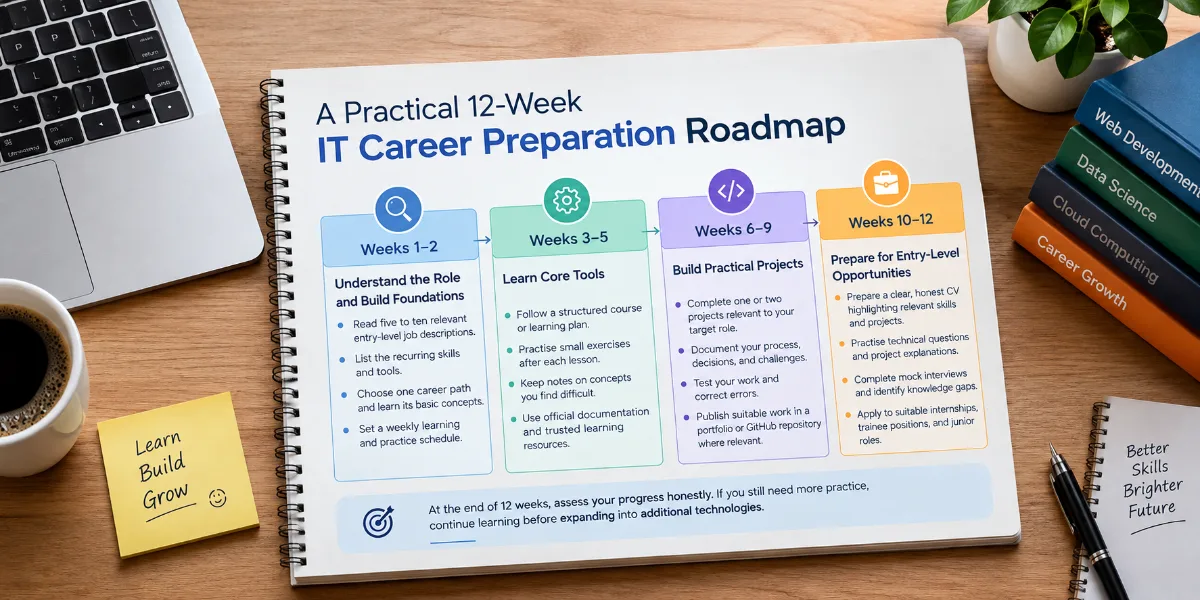
A Practical 12-Week IT Career Preparation Roadmap
Your learning timeline will depend on your starting knowledge, the complexity of the chosen field, and the time you can dedicate. The following 12-week plan is a sample structure for building momentum, not a guarantee of employment.
Weeks 1–2: Understand the Role and Build Foundations
- Read five to ten relevant entry-level job descriptions.
- List the recurring skills and tools.
- Choose one career path and learn its basic concepts.
- Set a weekly learning and practice schedule.
Weeks 3–5: Learn Core Tools
- Follow a structured course or learning plan.
- Practise small exercises after each lesson.
- Keep notes on concepts you find difficult.
- Use official documentation and trusted learning resources.
Weeks 6–9: Build Practical Projects
- Complete one or two projects relevant to your target role.
- Document your process, decisions, and challenges.
- Test your work and correct errors.
- Publish suitable work in a portfolio or GitHub repository where relevant.
Weeks 10–12: Prepare for Entry-Level Opportunities
- Prepare a clear, honest CV highlighting relevant skills and projects.
- Practise technical questions and project explanations.
- Complete mock interviews and identify knowledge gaps.
- Apply to suitable internships, trainee positions, and junior roles.
At the end of 12 weeks, assess your progress honestly. If you still need more practice, continue learning before expanding into additional technologies.
What Skills Help Every IT Fresher?
Although each career requires different technical knowledge, several skills are valuable across the technology industry.
- Problem-solving: Break a complex task into manageable steps and test possible solutions.
- Communication: Explain technical work clearly to colleagues and non-technical stakeholders.
- Practical experience: Demonstrate what you can do through projects, exercises, or internships.
- Version control: Learn Git and GitHub if they are relevant to your chosen path.
- Research skills: Read documentation and investigate unfamiliar errors independently.
- Teamwork: Understand feedback, document work, and collaborate professionally.
- Continuous learning: Keep your knowledge current as tools and working practices change.
Do Certifications Matter for IT Freshers?
Certifications can provide structured learning and demonstrate knowledge of a particular technology. Their value varies by role and employer, so research the requirements for your target positions before paying for an exam.
Depending on your chosen field, you might explore entry-level AWS, Microsoft Azure, or Google Cloud learning paths; courses covering SQL and data visualisation; foundational cybersecurity training; structured programming courses; or software testing fundamentals.
A certificate alone does not guarantee a job. Combine learning credentials with hands-on practice, a relevant portfolio, and interview preparation.
How ExcelPTP Can Help You Prepare for an IT Career
Choosing a career path is only the first step. You also need a learning plan, opportunities to practise, and a way to prepare for interviews. ExcelPTP provides IT training programmes designed to develop practical skills and support career preparation.
Depending on your interests and the programme available, you can explore training in areas such as web development, full-stack development, and software testing. ExcelPTP also describes practical project training, individual attention, and placement support as part of its training approach.
Before enrolling, discuss the curriculum, training duration, project work, eligibility, fees, and placement terms with the institute so you can decide whether the programme fits your needs.
Conclusion: Choose One IT Career Path and Start Practising
The best IT careers for freshers are not determined by popularity alone. They depend on the work you enjoy, the skills you develop, and the evidence you can show employers.
Start by comparing a few roles, reviewing job descriptions, and selecting one realistic learning path. Build your foundations, complete relevant projects, and prepare to explain your work confidently. If you need structured guidance, explore suitable training and career counselling options before committing to a programme.
Take your first step towards an IT career. Connect with ExcelPTP to explore training options and discuss a learning path that aligns with your career goals.